This panel of the Customizer contains the WooCommerce shop settings of the site. If you don’t see this panel, then go to Dashboard > Plugins > WooCommerce and activate it.
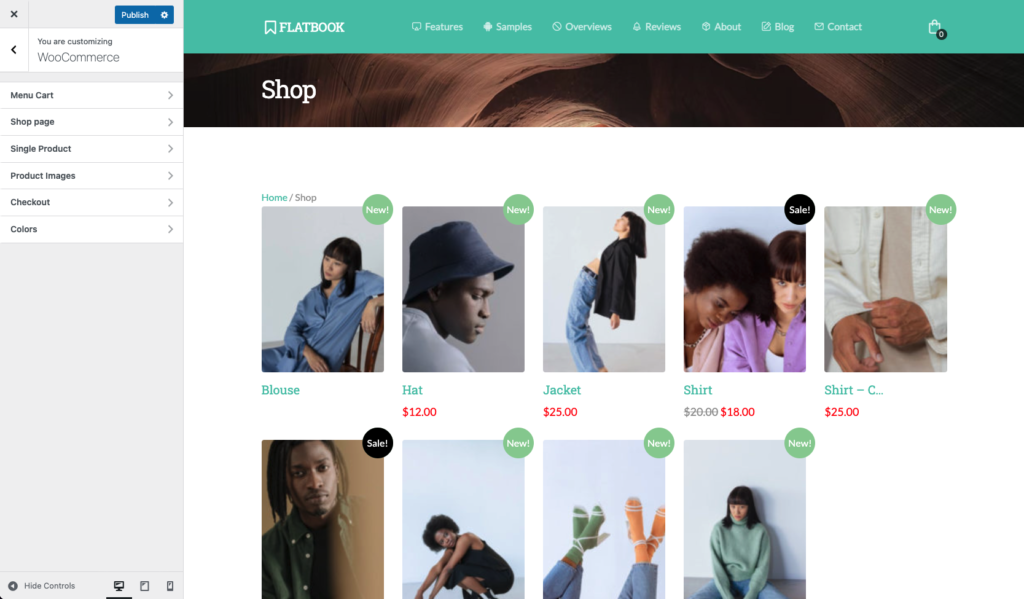
Menu Cart
Set up the menu cart icon in the navigation bar.
- Show menu cart: set to show or hide the menu cart icon in the navbar
- Menu cart icon: choose from 3 icon layouts for the menu cart (if menu cart is enabled)
Shop page
Here you can set up the WooCommerce shop page settings.
- Shop page header: set to show or hide the shop page header
- Shop page title: enter the title for the shop page header (if shop page header enabled)
- Sidebar layout: select the sidebar layout of the shop page (left sidebar / no sidebar / right sidebar)
- Product columns: set how many products should be shown per a row
- Products per page: set how many products should be shown per a page
- Show breadcrumbs: set to show or hide breadcrumbs on the top of the shop page
- Show category: set to show or hide product categories above the title.
- Show price: set to show or hide product price below the product title.
- Show new badge: set to show or hide new product badge on the top right of each new product.
- Product hover effect: choose the hover effect to show when the mouse is over a product
- Default product sorting: set how should products be sorted in the catalog by default
Single Product
Here you can set up the WooCommerce single product page settings.
- Show page header: set to show or hide the single product page header
- Page title: enter a page title to show up in the product page header
- Show product zoom: set to show or hide zoom icon on product to open the image in lightbox
- Show product metas: set to show or hide the product categories, tags and other metas above tabs (if have)
- Show related products: set to show or hide related products below the product content
- Related products count: set how many related products to show
Product Images
In this section you can customize the product image related settings.
- Thumbnail cropping: set how to crop product thumbnails for the shop page (1:1 / Custom / Uncropped)
- Catalog image height: sets the height of the product thumbnail on shop pages
- Single product image height: set the product image height on single product pages
- Related products image height: set the height of the related product images (if related products enabled)
Checkout
In this section you can customize the Checkout page of WooCommerce.
- Company name field: set to show or hide the “Company name” field in the form
- Address line 2 field: set to show or hide the second address line field in the form
- Phone field: set to show or hide the “Phone” field in the form
- Coupon code block: set to show or hide the coupon code block at the top of the checkout page
- Required fields: highlight required form fields with an asterisk
- Order notes: set to show or hide the “Order Notes” textarea for additional information
- Privacy policy: add some text about your store privacy policy to show during checkout
- Privacy policy page: choose your “Privacy Policy” page from your pages (if you have)
- Terms and conditions page: choose your “Terms & Conditions” page from your pages (if you have)
Colors
Set the color of the elements from the WooCommerce panel.
